
Developers
API v1

Bring certified messaging into your applications.

Send messages, verify one-time codes and automate your InoWings campaigns from your own tools. A signed, documented REST API with ready-to-copy samples.

Base URLhttps://proino.inowings.com/api/v1
GET /status → 200
{
  "ok": true,
  "data": {
    "authenticated": true,
    "from_ndest": "C0000000XXXX",
    "scopes": [
      "messages:send",
      "templates:list",
      "files:upload",
      "status:read",
      "otp:verify"
    ],
    "limits": {
      "rate_per_min": 60,
      "rate_send_min": 30,
      "daily_send_max": 1000
    },
    "server_time_utc": "2026-04-25T12:34:56+00:00"
  },
  "request_id": "req_abc123"
}
Why InoWings

The tools you need to integrate fast and right.

InoWings gives your applications a certified, encrypted and sovereign messaging channel. On the developer side, everything is designed so that integration takes hours, not weeks.

A simple REST API

Five endpoints, JSON in and out, responses that always share the same shape (ok, data, request_id). Your first message goes out within minutes.

Bank-grade security

Every request is signed with HMAC-SHA256, timestamped and protected against replay by a unique nonce. Each key only opens the permissions it needs.

Ready-to-copy code

Complete samples in cURL, PHP, Python and Node.js, plus a Postman collection to import from your console.

Everything is measured

Every response carries a request_id. Your console shows today’s calls, the success rate and the average latency.

Clear limits

Per-minute and per-day quotas known in advance, returned by GET /status and adjustable on request.

A European platform

The API is operated by InoWings and hosted in Europe: your integration depends on no platform outside Europe.

Getting started

Your first call in three steps.

  1. 01

    Open your account

    Create your InoWings Desk account, then turn on API access in Pro Settings.

  2. 02

    Create your key

    In API Settings, click “New key”. Copy the secret straight away: it will never be shown again.

  3. 03

    Sign your first request

    Call GET /status with one of the samples below. A "authenticated": true response confirms that your signature is correct.

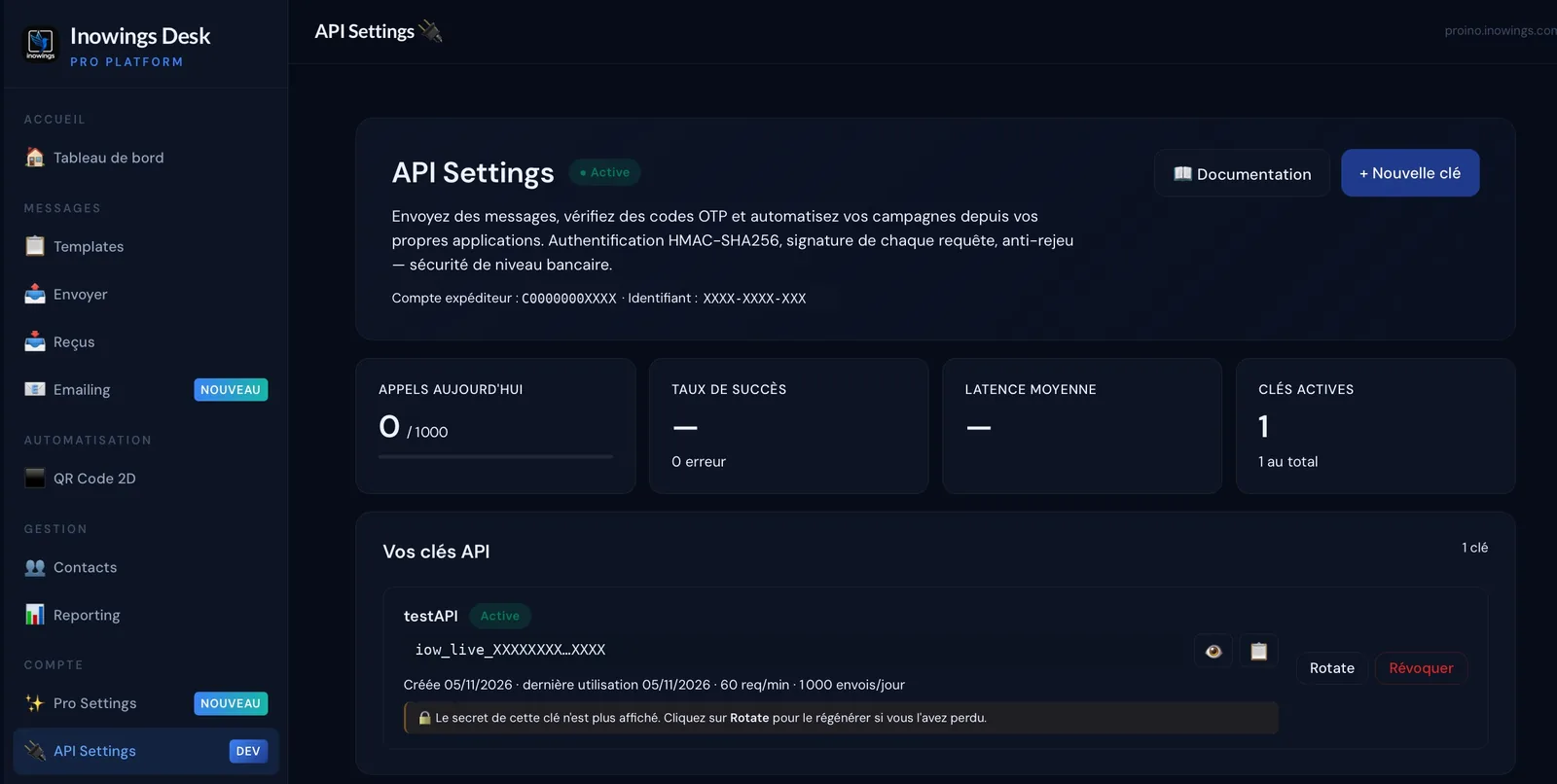
API Settings screen of the InoWings Desk console: call metrics and API key (identifiers masked)

Everything is managed from API Settings

Your InoWings Desk console brings your keys, your metrics and the documentation together in one place.

  • Create, rotate and revoke keys in one click
  • Secret shown only once, when the key is created
  • Today’s calls, success rate and average latency
  • Postman collection ready to import
  • Reference documentation available from the console
Code samples

A signed client, ready to copy.

Each sample computes the signature and sends a message; the PHP, Python and Node.js versions first check your access with GET /status. Replace API_KEY and API_SECRET with the values of your key.

#!/usr/bin/env bash
# InoWings API v1 — signed request with curl + openssl
API_KEY='<API_KEY>'
API_SECRET='<API_SECRET>'   # keep it server-side only

METHOD='POST'
ROUTE='messages'
BODY='{"recipients":["+33XXXXXXXXX"],"title":"Order confirmed","text":"Your order has been confirmed."}'

TS=$(date +%s)
NONCE=$(openssl rand -hex 12)
BODY_HASH=$(printf '%s' "$BODY" | openssl dgst -sha256 -r | cut -d' ' -f1)
SIG=$(printf '%s\n%s\n\n%s\n%s\n%s\n' "$METHOD" "/api/v1/$ROUTE" "$TS" "$NONCE" "$BODY_HASH" \
      | openssl dgst -sha256 -hmac "$API_SECRET" -r | cut -d' ' -f1)

curl -sS -X "$METHOD" "https://proino.inowings.com/api/v1/$ROUTE" \
  -H 'Content-Type: application/json' \
  -H "X-Inow-Key: $API_KEY" \
  -H "X-Inow-Timestamp: $TS" \
  -H "X-Inow-Nonce: $NONCE" \
  -H "X-Inow-Signature: $SIG" \
  --data-raw "$BODY"
Your key’s secret signs your requests: keep it on your server, never in a mobile app or in code that runs in the browser.
Reference

The API v1 documentation.

All responses are JSON and share the same shape: an ok field, the payload in data, and a request_id for tracing.

Authentication

Every request carries 4 HTTP headers. The HMAC-SHA256 signature protects the request against eavesdropping, tampering and replay.

HeaderValue
X-Inow-KeyYour public key (e.g. iow_live_abc123…)
X-Inow-TimestampUnix UTC timestamp, in seconds (e.g. 1735000000)
X-Inow-NonceUnique random string (12 bytes in hex recommended)
X-Inow-SignatureHex HMAC-SHA256 of the canonical string

Rules to follow

  • The timestamp must be within ±5 minutes of the server time: keep your clock in sync (NTP).
  • Each nonce is unique per key. A nonce that has already been used is rejected immediately.
  • The secret never leaves your server: not in Git, not in a mobile app, not in code that runs in the browser.

Computing the signature

Compute the HMAC-SHA256 of the canonical string below with your key’s secret, as lowercase hex. PATH includes the /api/v1 prefix; QUERY_STRING is empty when the URL has no parameters.

HMAC-SHA256
canonical = METHOD + "\n" +
            PATH + "\n" +
            QUERY_STRING + "\n" +
            TIMESTAMP + "\n" +
            NONCE + "\n" +
            SHA256_HEX(BODY) + "\n"

signature = HMAC-SHA256(API_SECRET, canonical)  →  hex, lowercase

Endpoints

GET/statusRequired scope: status:read

Check your access

Authenticated test call. Ideal to validate your signature before sending real traffic: it also returns your scopes and limits.

Response 200
{
  "ok": true,
  "data": {
    "authenticated": true,
    "from_ndest": "C0000000XXXX",
    "scopes": [
      "messages:send",
      "templates:list",
      "files:upload",
      "status:read",
      "otp:verify"
    ],
    "limits": {
      "rate_per_min": 60,
      "rate_send_min": 30,
      "daily_send_max": 1000
    },
    "server_time_utc": "2026-04-25T12:34:56+00:00"
  },
  "request_id": "req_abc123"
}
GET/templatesRequired scope: templates:list

List your templates

Returns the active templates of your account, with the fields to fill in for each one.

Response 200
{
  "ok": true,
  "data": {
    "templates": [
      {
        "id": 22,
        "title": "Order confirmation",
        "type": 1,
        "fields": [
          "client_name",
          "order_id",
          "delivery_date"
        ],
        "text_preview": "Hello #client_name#, your order #order_id# will be delivered on #delivery_date#."
      }
    ]
  }
}
POST/filesRequired scope: files:upload

Upload an attachment

Uploads a file (multipart/form-data) and returns a token to use in POST /messages.

  • file field: the file to upload. Maximum size: 30 MB.
  • Accepted extensions: jpg, jpeg, png, gif, webp, pdf, mp4, mov, mp3, wav, doc, docx, xls, xlsx, ppt, pptx, txt, zip.
  • For multipart, the signature is computed with an empty body: SHA256("").
Request
Content-Type: multipart/form-data

file = @invoice.pdf
Response 200
{
  "ok": true,
  "data": {
    "attachment": "20261125_104530_abc123.jpg",
    "size_bytes": 87432,
    "original": "invoice.pdf"
  }
}
POST/messagesRequired scope: messages:send

Send a message

Queues a send to 1 to 30 recipients in the InoWings send queue. Two modes to choose from: a written message (mode A) or a personalised template (mode B).

  • Modes A and B are mutually exclusive: mixing template_id with title/text returns the MIXED_MODE error.
Request fields
recipientsarray
1 to 30 recipients: mobile number (+33…) or InoWings ID (ABCD-1234-EFGH).
titlestring
Mode A. Optional, 200 characters max.
textstring
Mode A. Required when there is no attachment.
attachmentstring
Mode A. Token returned by POST /files.
template_idinteger
Mode B. ID of one of your active templates.
fieldsobject
Mode B. Must contain exactly the template’s #name# fields.
send_atstring
Optional. Scheduled send, format YYYY-MM-DD HH:MM:SS (UTC).
Mode A — written message
{
  "recipients": [
    "+33XXXXXXXXX",
    "ABCD-1234-EFGH"
  ],
  "title": "Order confirmed",
  "text": "Your order has been confirmed.",
  "attachment": "20261125_104530_abc123.jpg",
  "send_at": "2026-05-01 09:00:00"
}
Mode B — from a template
{
  "recipients": [
    "+33XXXXXXXXX"
  ],
  "template_id": 22,
  "fields": {
    "client_name": "Mary",
    "order_id": "ORD-7841",
    "delivery_date": "2026-05-12"
  }
}
Response 201
{
  "ok": true,
  "data": {
    "campaign_id": "f47ac10b-58cc-4372-a567-0e02b2c3d479",
    "inserted_count": 2,
    "recipients": [
      "+33XXXXXXXXX",
      "ABCD-1234-EFGH"
    ]
  }
}
POST/otp-verifyRequired scope: otp:verify

Verify a one-time code

Checks that the one-time code entered by your customer matches the one generated by InoWings for their number. A ±1 minute tolerance absorbs network delays.

  • "match": false is not an error: it is a normal result (wrong or expired code).
  • A real error (verification service unreachable) returns "ok": false with a dedicated code, for example CENTRAL_UNREACHABLE.
  • Dedicated limit: 10 verifications per minute per key, against brute-force attacks.
Request
{
  "phone": "+33XXXXXXXXX",
  "otp": "294474"
}
Response 200 — valid code
{
  "ok": true,
  "data": {
    "match": true,
    "phone": "+33XXXXXXXXX",
    "verified_at": "2026-04-25T12:35:42+00:00",
    "latency_ms": 142
  }
}
Response 200 — invalid code
{
  "ok": true,
  "data": {
    "match": false,
    "phone": "+33XXXXXXXXX"
  }
}
Errors and limits

Explicit errors, clear limits.

On error, the response contains ok set to false, a stable code to handle in your code, and a request_id to give our support team for diagnosis.

MISSING_AUTH_HEADERS401
One of the 4 authentication headers is missing.
INVALID_API_KEY401
Unknown key.
API_KEY_REVOKED401
Revoked key.
API_NOT_AUTHORIZED403
API access is not enabled on this account.
INVALID_TIMESTAMP401
Malformed timestamp.
TIMESTAMP_OUT_OF_RANGE401
More than 5 minutes away from the server time.
NONCE_REUSED401
Nonce already used (replay protection).
INVALID_SIGNATURE401
The signature does not match.
SCOPE_FORBIDDEN403
This key does not have the required scope.
RATE_LIMIT_EXCEEDED429
Per-minute quota exceeded.
DAILY_QUOTA_EXCEEDED429
Daily quota exceeded.
EMPTY_MESSAGE400
Empty text and no attachment.
MIXED_MODE400
template_id mixed with title/text.
INVALID_RECIPIENT400
Malformed mobile number or InoWings ID.
TOO_MANY_RECIPIENTS400
More than 30 recipients.
TEMPLATE_NOT_FOUND404
Template does not exist or does not belong to you.
MISSING_FIELDS / EXTRA_FIELDS400
fields does not match the template’s fields.
ATTACHMENT_NOT_FOUND400
Invalid attachment token.
INVALID_PHONE400
International format expected (E.164, +…).
INVALID_OTP_FORMAT400
The code must have 6 digits.
CENTRAL_UNREACHABLE502
The verification service is not responding.

Default limits

60
requests per minute, all endpoints combined
30
sends per minute on POST /messages
10
verifications per minute on POST /otp-verify
1,000
sends per day per key

Need more? Limits can be raised on request: get in touch.

Best practices

A robust integration from day one.

01

Keep the secret server-side

Never in a compiled mobile app, a public Git repository or code that runs in the browser.

02

Renew your keys

Every 6 months, or immediately if you suspect a leak: “Rotate” button in API Settings.

03

Keep the request_id

Store it in your logs: it lets our support team find a specific call if something goes wrong.

04

Keep your clock in sync

A server on time avoids TIMESTAMP_OUT_OF_RANGE rejections. On Linux: timedatectl status.

05

Reuse your attachments

Upload a file once and reuse its token for all recipients.

Use cases

What your applications can do.

One-time codes

Your customer gives you the code generated by InoWings; you verify it in a single call, without generating or storing any code on your side. A safer alternative to SMS.

POST /otp-verify

Transactional notifications

Order confirmations, appointments, account alerts: triggered by your application, with an invoice or a ticket attached when needed.

POST /messages

Campaigns from your CRM or ERP

Your InoWings Desk templates, personalised field by field from your own data, and scheduled at the time of your choice.

GET /templates

Ready to plug in your application?

Create your account, generate your key and send your first signed message today. For a broader integration, our team is here to help.

Technical support: support@inowings.com