
Email campaigns that actually arrive.
Build your campaigns in the InoWings Desk console, send them to your contacts and track the results. Sender authentication, unsubscribes, dead addresses, complaint thresholds: everything is handled before your first send.
Sending an email is no longer enough. It has to be received.
Before it is read, every email is sorted by the recipient’s mailbox provider. The major providers have tightened their rules: senders who ignore them end up in spam, or never arrive at all.
marketing emails sent with the recipients’ consent never reaches the inbox.
of the addresses on a list become invalid or risky within a year.
spam complaints: the threshold set by the major mailbox providers that must not be exceeded.
Following these rules is a specialist’s job. With InoWings, it’s included.
Every requirement has an answer.
These protections are active on every account. They cannot be switched off: that is what protects the reputation of your sends.
- 01
Authenticate the sender
An authenticated, aligned sending domain from activation, with no configuration on your part.
- 02
One-click unsubscribe
A visible link in every email plus the mailbox providers’ native button, applied immediately.
- 03
Stop writing to dead addresses
Any address that hard-bounces is automatically removed from subsequent sends.
- 04
Stay below complaint thresholds
A complaint excludes the address; above the threshold, the campaign pauses itself.
- 05
Build your reputation step by step
Volumes increase in stages, at the pace of the quality of your sends.
- 06
Respect consent
Rules accepted at activation; the sender’s legal details in a locked email footer.
A campaign that goes wrong stops by itself.
The sending engine monitors every campaign continuously. If feedback deteriorates, it stops before your sender reputation suffers.
- 01
Continuous monitoring
Delivered, bounced, complaints: every response from the mailbox providers is counted while sending.
- 02
Automatic pause
Above 5% bounced addresses or 0.1% complaints, sending stops by itself.
- 03
You are notified
The reason is shown clearly in your console, and our support team contacts you before anything resumes.
- 04
Nothing is lost
If you stop the campaign, the emails that were not sent are refunded.
You stay in control: pause, resume or stop at any time, with progress updated every 15 seconds.
From idea to send, no technical skills needed.
A wizard guides you step by step. Every step is saved: you can stop and pick up later.
- Step 01
Recipients
Choose one or more directories from your address book. Duplicates, invalid addresses and unsubscribed contacts are excluded automatically before launch.
- Step 02
Content
Start from a ready-made template or a blank page. Drag in your blocks, add your images and personalised fields (first name, company…).
- Step 03
Test
Receive your email before your customers do to check how it looks on desktop and mobile: 10 free tests every day.
- Step 04
Scheduling
Send right away or on the date of your choice. The exact amount is displayed, and you confirm it before launch.
An editor designed for non-specialists
- Six starter templates, ready to customise
- Drag-and-drop editor, without a single line of code
- Images automatically resized and compressed, location data removed from photos
- Locked email footer: your legal details and the unsubscribe link are always there
- Display adapted to the main mailbox providers, Outlook included
- Automatic backup copy and a warning before leaving without saving
Useful numbers, without tracking your readers.
You know what happened to your emails without spying on the people who receive them: no tracking pixel, no cookie.
Mailbox provider responses
Delivered, bounced, complaints, unsubscribes: updated within seconds.
Clicks, link by link
Counted anonymously, with no tracking pixel or cookie.
Thresholds always visible
Each indicator shows its safety limit.
Your reports
Monthly and daily summaries, one-click export, links ready for your analytics tool.
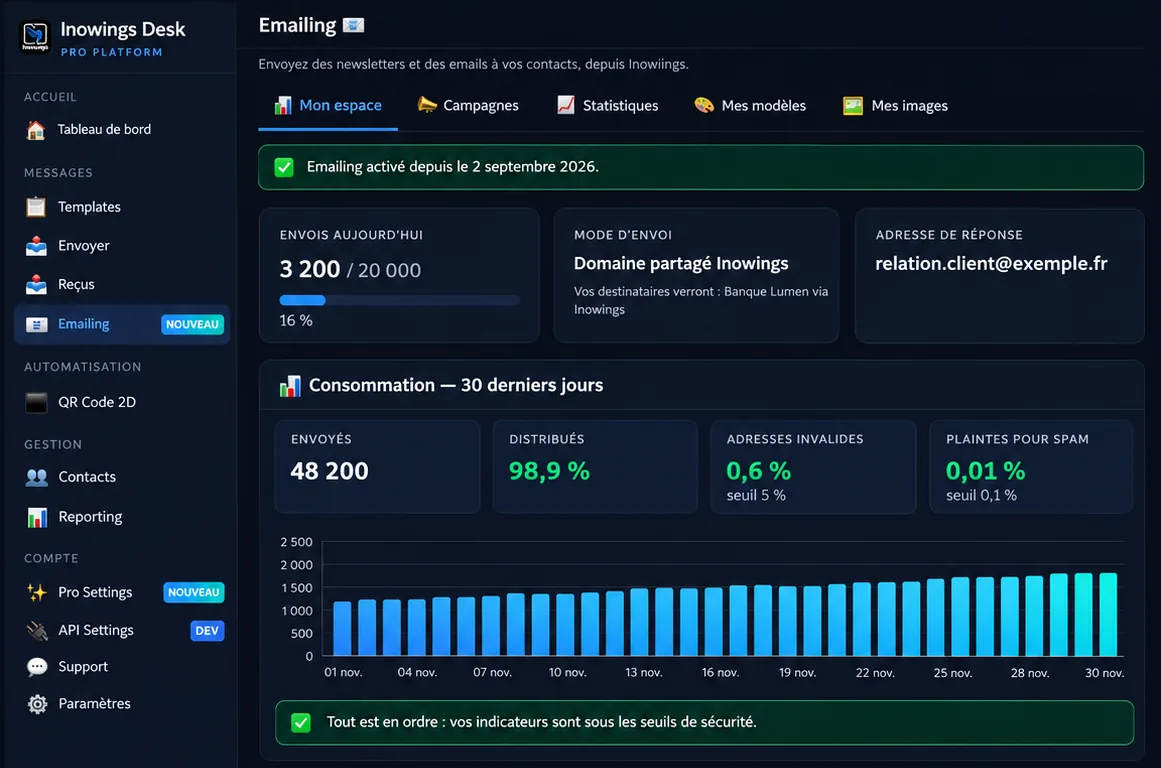
Your domain or ours.
Start in minutes with sending through InoWings, then switch to your own sending server whenever you wish.
Sending via InoWings
Your emails go out from an InoWings domain that is already authenticated. Your contacts see your company name, and their replies arrive in your inbox.
- No technical setup
- Your company name displayed as the sender
- Replies sent to your address, verified by code
- Gradual, supervised volume ramp-up
Your own sending server
Send from your own domain’s address, with your mail server. InoWings checks your domain configuration and tells you what to fix.
- Diagnosis of your domain (SPF, DKIM, DMARC)
- Records ready to copy into your hosting provider’s settings
- Encrypted password, never displayed or transmitted
- Activation on request, after validation by InoWings
Your contacts stay yours.
The platform is designed to respect your recipients as much as your obligations.
Consent respected
Only the contacts you have imported are offered. InoWings app users are never added to your campaigns.
Anonymous clicks
A click is counted for the link, never for the person: no email address, IP address or cookie is recorded.
Limited retention
After 13 months, recipient-level data is erased; only the totals remain. The unsubscribe list is kept so that those contacts are never written to again.
Controlled hosting
Data hosted in Europe. For organisations that require it, the platform can be deployed in their own country.
Pay for what you send. Nothing more.
No bundle to use up, no activation fee for emailing: you pay for the emails actually sent.
- Exact amount displayed and confirmed before every launch
- Unsent emails refunded if you stop the campaign
- 10 free test emails every day
- Volume price lists and dedicated plans: contact us
Your questions about emailing.
Missing a question? Write to us, answer within 24 hours.
Do I need technical skills?
No. The editor works by drag and drop, and the campaign wizard guides you through four steps. With sending via InoWings, no domain setup is needed: you can send your first campaign on the day you sign up.
Can I import my contacts?
Yes, from the console’s address book: CSV or Excel import, multiple directories, duplicate detection. Only import contacts who have agreed to receive your emails: it is a legal requirement, and the best guarantee that your emails will be received.
How much does a campaign cost?
You pay for the emails actually sent, at a rate that decreases with volume (see the Pricing page), with no mandatory subscription. The exact amount is calculated after excluding invalid, duplicate or unsubscribed addresses, and you confirm it before launch. If you stop a campaign in progress, the unsent emails are refunded.
Why can a campaign be paused without me?
To protect the reputation of your sends. If more than 5% of addresses bounce or more than 0.1% of recipients mark the email as spam, sending stops by itself. The reason is shown in your console and our support team contacts you before anything resumes. You can also stop the campaign yourself: the unsent emails are refunded.
Can my recipients unsubscribe easily?
Yes. Every email contains a visible unsubscribe link, and the major mailbox providers display their own button. Unsubscribes are applied immediately: the address is excluded from all your subsequent sends.
Can I send from my company’s address?
Yes, in two ways. With sending via InoWings, your company name is displayed as the sender and replies arrive at your address, verified by code. You can also ask to send through your own mail server: InoWings checks your domain configuration and validates the setup before the first send.
Do you track opens?
No, deliberately. Tracking opens means placing a spy image in every email, and some mailbox providers now distort that figure to protect their users’ privacy. We give you reliable indicators instead: emails delivered, clicks per link, unsubscribes and complaints.
Ready to take back control of your communications?
A tailored meeting to turn your idea into a concrete solution: use cases, possible architecture, business integration and a walkthrough of the InoWings features that fit your needs.